Defining the two methods
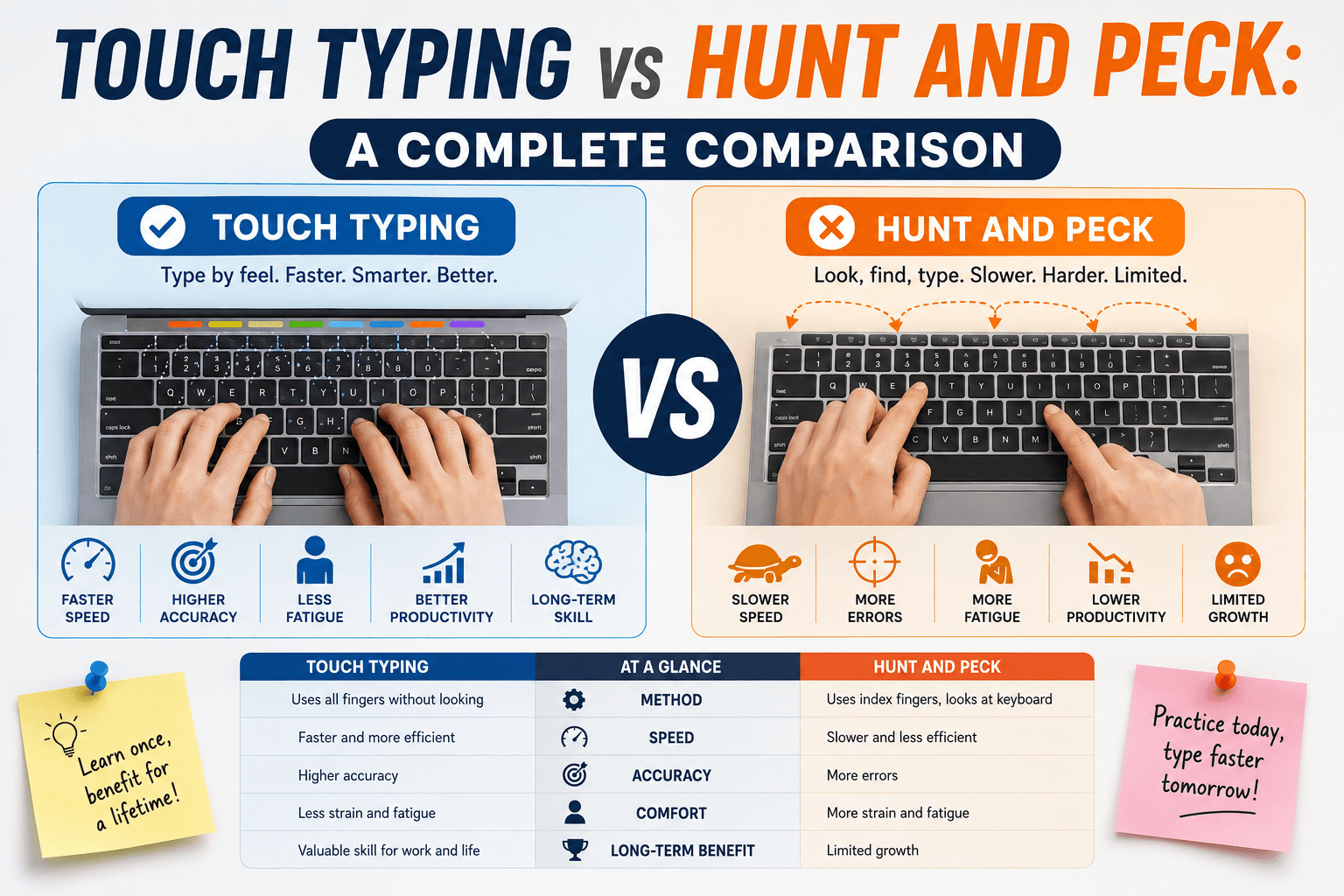
Hunt and peck — also called two-finger typing or pointer typing — involves looking at the keyboard to locate each key and pressing it with one or two fingers. The name comes from the visual process of hunting for the key and then pecking at it. Many people develop this style organically from their first contact with a keyboard and never receive formal instruction to change it. It works well enough for casual use, but its speed ceiling is fundamentally limited by the visual lookup step for each keystroke.
Touch typing removes that lookup step entirely. The typist memorises which finger is responsible for each key on the keyboard, rests their hands on the home row (ASDF · JKL;), and strikes keys from muscle memory without glancing down. All ten fingers contribute, the eyes stay on the screen, and the cognitive pathway from word to typed character becomes essentially automatic at high speed. The two methods are not merely different styles — they are different neural programs.
Speed comparison: what the data shows
Multiple studies comparing the two methods show a consistent pattern. Researchers at Aalto University in Finland (2018) studied 168 typists and found that, on average, touch typists typed at around 60–70 WPM while hunt-and-peck typists averaged around 50–60 WPM for regular computer users. However, the most dedicated hunt-and-peck typists in the sample reached WPMs competitive with average touch typists — suggesting that raw practice time narrows the gap. The critical difference appears at the higher end: the fastest typists in the study almost all used touch typing with all ten fingers.
Informal data from large typing test platforms consistently shows that the highest WPM scores — 100 WPM and above — are overwhelmingly achieved by touch typists. The mechanical reason is simple: a hunt-and-peck typist using two fingers can only press one key at a time from a single hand, while a touch typist can overlap finger movements, beginning the reach for the next key while the current keystroke is completing. This parallelism is physically impossible with hunt and peck.
Ergonomics and health differences
Beyond speed, the two methods have different ergonomic profiles. Hunt-and-peck typists typically spend more time looking down, which causes neck flexion — the head tilting forward and down. Over long sessions, this posture strains the cervical spine. Occupational therapists frequently see this as a contributing factor in neck and upper-back pain in office workers who type for hours each day. Touch typists, by contrast, keep their head neutral and their gaze at screen level.
Touch typing also distributes keystrokes across ten fingers and both hands, reducing the per-finger workload. A hunt-and-peck typist using two index fingers concentrates all the mechanical work on those two fingers and their associated tendons. While repetitive strain injury (RSI) can affect any typist, the load distribution in touch typing is fundamentally more balanced. That said, touch typing at high speed with poor wrist posture carries its own RSI risk — ergonomics matters regardless of method.
Cognitive load differences
One underrated advantage of touch typing is reduced cognitive load during complex tasks. When a hunt-and-peck typist is composing a sentence, part of their working memory is occupied with finding the next key. This competes with the thinking required to choose words, structure sentences, and maintain the thread of an argument. Touch typists, at sufficiently high skill levels, offload keystroke execution to procedural memory (the same system that handles walking or driving) and free up working memory for higher-order composition.
Writers, programmers, and anyone who thinks while typing — which is almost everyone in a knowledge work context — benefit from this cognitive offloading. Many professional writers report that reaching touch-typing fluency changed how they experienced writing: instead of the text lagging behind their thoughts, it kept pace, which reduced the frustration of losing a well-formed sentence because the mechanics slowed them down.
How long does the transition take?
The honest answer is: two to six weeks of discomfort followed by a permanent improvement. In the first week or two, your WPM will drop — sometimes dramatically. A hunt-and-peck typist at 45 WPM may drop to 15–20 WPM when first attempting to use all ten fingers correctly. This is normal and temporary. The brain is laying down new neural pathways while the old pathways are still dominant.
By the end of week four, most people who practice ten to fifteen minutes daily reach their old pre-transition WPM again but with the correct technique. By weeks six to eight, they typically surpass it. The transition is uncomfortable in the way that any relearning is uncomfortable, but it is reliably worth it. The key discipline is resisting the urge to revert to hunt and peck when you need to type something quickly — every reversion reinforces the old pattern and slows the transition.
How to make the switch effectively
Start with the home row only (ASDF and JKL;) and do not rush to add other keys. Spend two to three days on home-row drills alone until those eight keys feel automatic. Then add the top row (specifically E and I first, since they are among the most frequent letters in English). The TypingMonk tutorial is structured exactly this way — each chapter introduces a small set of new keys with targeted exercises before moving on.
Set a deliberate rule for yourself: use the correct finger or do not type. This rule slows you down in the short term but prevents the compromise system where you use mostly correct fingers with a few hunt-and-peck exceptions — a hybrid that creates a much longer learning period. Use the 1-minute test on Easy difficulty during the transition phase so the vocabulary does not add unnecessary challenge on top of the technique change.
Should long-time hunt-and-peck typists switch?
For someone who types professionally or types for more than an hour per day, the answer is almost always yes — the long-term return on the short-term investment is significant. For someone who types only occasional messages or fills in forms a few times a week, the cost-benefit calculation is less clear and the choice is personal.
Age is not a meaningful barrier. Adults in their 40s, 50s, and beyond who commit to the transition consistently succeed, though the initial adaptation period may be slightly longer than for younger learners. The neural plasticity required for this learning remains available throughout adult life. What determines success is the consistency of practice and the willingness to tolerate the temporary slowdown.
Put it into practice
Take a free typing test and see your WPM right now.
Comments
Sign in to leave a comment.