How WPM is calculated
WPM — words per minute — is the universal measure of typing speed. The standard definition counts every five characters (including spaces and punctuation) as one word. So if you type a sentence that is 300 characters long in one minute, your raw WPM is 60 (300 ÷ 5). This normalizes the measurement across typists using different vocabulary and prevents the score from being inflated by typing lots of short two-letter words.
Net WPM adjusts the raw score by subtracting for errors. A common formula is: Net WPM = (Characters typed ÷ 5 − Errors) ÷ Time in minutes. Some employers use net WPM as their benchmark, so understanding both figures is important when preparing for a job assessment. TypingMonk displays both WPM and accuracy so you can calculate your approximate net WPM at a glance.
Why benchmarks are ranges, not single numbers
Typing speed benchmarks are published as ranges because individual variation is enormous. Age, keyboard familiarity, hand size, typing style, language background, and the specific text being typed all affect the result. A professional who types in English all day will score higher on an English test than a multilingual professional whose first language uses a different script. Benchmarks also shift over time — as more people grow up using digital devices from childhood, average typing speeds have increased compared to benchmarks from the 1990s.
The figures below are drawn from occupational studies, employer requirements, and large-scale typing test data. Treat them as useful reference points rather than hard standards. What matters most for your situation is whether your speed meets the requirements of the role you are targeting — or, for personal use, whether your speed is growing over time.
General WPM benchmarks by level
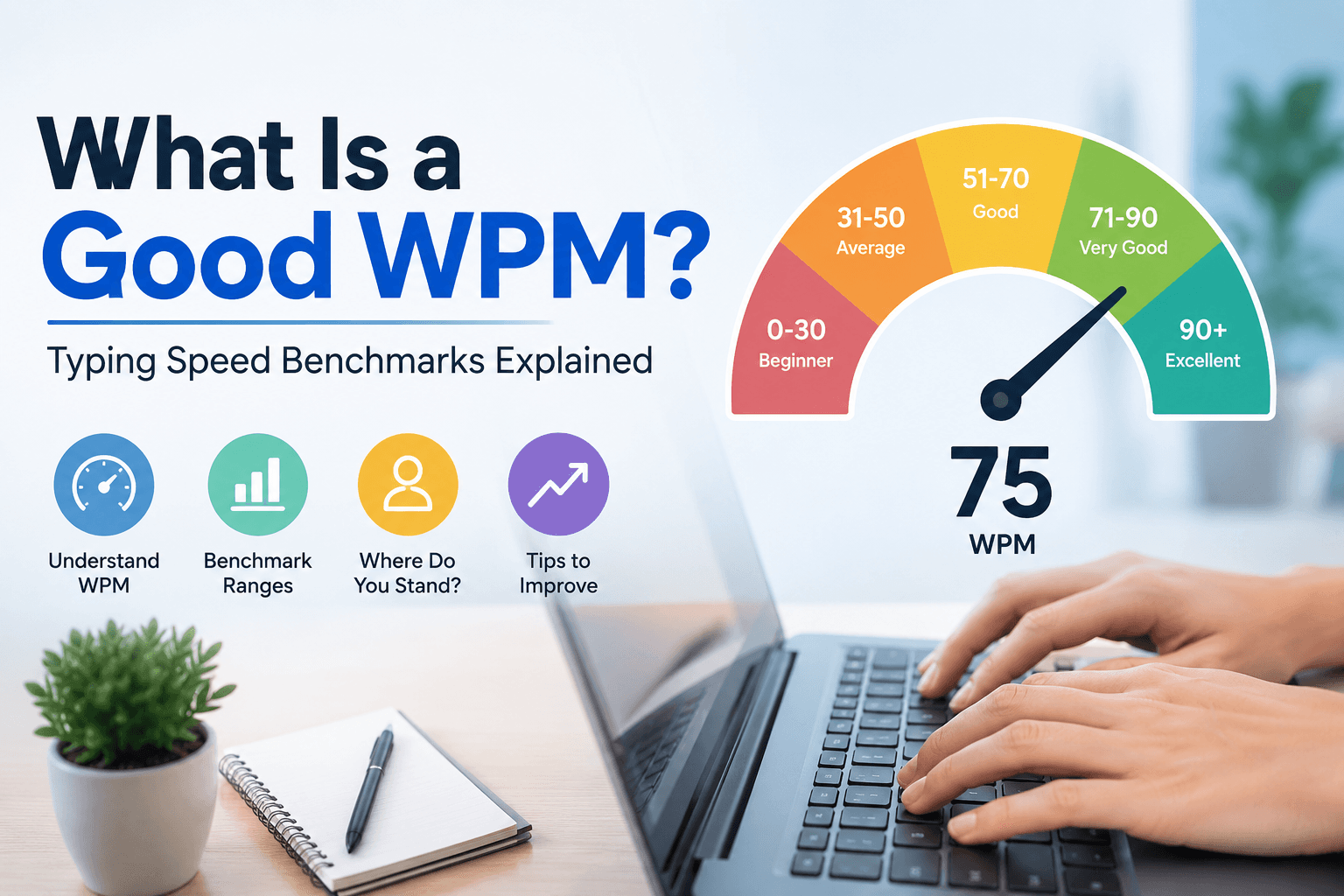
Beginner (under 30 WPM): This range is typical for people who are new to typing or who have never learned a systematic method. Most beginners use a hunt-and-peck style. With structured practice, beginners can leave this range within two to three months. Average / casual (30–50 WPM): Many adults who type regularly but have never taken a typing course fall into this range. Emails and short messages get done at a comfortable pace, but longer documents feel slow.
Competent (50–70 WPM): This range covers the majority of office workers and college students. Most employers who list a minimum typing requirement set it between 50 and 60 WPM. At 60 WPM with 95% accuracy, you can type a 500-word document in under ten minutes with minimal correction time. Good to excellent (70–90 WPM): Typists in this range are noticeably faster than average. Administrative roles, transcription work, and content creation benefit significantly from speed in this band. Professional / specialist (90+ WPM): Court reporters, high-volume transcriptionists, and competitive typists operate here. Reaching 90+ WPM reliably requires deliberate technique and sustained practice.
Typing speed expectations by profession
General office and administrative roles typically require 40–60 WPM. Many job postings in customer service, HR, and office administration list 50 WPM as the minimum. Data entry and transcription roles set higher bars: 60–80 WPM is common, and some specialist transcription roles require 90+ WPM with very high accuracy (98%+). Legal secretaries and court reporters often face the highest standards — court reporters are typically required to achieve 225 words per minute on a stenotype machine, though stenography is a different skill from standard keyboard typing.
For software developers, typing speed is less of a bottleneck than many assume — developers spend a large proportion of their time thinking, reading documentation, and debugging rather than typing. That said, faster typing does reduce friction when writing code, comments, and documentation. For writers and journalists, 60–80 WPM is a practical floor for keeping pace with thought flow. Content writers producing 1,000–3,000 words per day benefit significantly from speeds above 70 WPM.
WPM benchmarks for students
Primary school students (ages 8–12) typically reach 10–25 WPM after initial typing instruction. High school students with regular computer use commonly reach 30–50 WPM. University students who use laptops for lectures and essays often fall in the 45–65 WPM range. Exams that involve typed responses — increasingly common in higher education — create a practical motivation to reach at least 50 WPM before the academic year begins.
Some schools test typing speed at the end of specific courses. A practical benchmark for secondary students is 40 WPM with 95% accuracy as a minimum for productive academic typing, and 55–60 WPM as a comfortable goal. Reaching these benchmarks rarely requires more than a few months of ten-minute daily practice using a structured typing tutorial.
Setting a realistic personal goal
Once you have established your current WPM with a few test sessions on different days, set a target that is 10–15 WPM above your current average. This is achievable within four to eight weeks of consistent practice and specific enough to guide your sessions. Chasing a vague goal like 'type faster' is less effective than a concrete target like 'reach 65 WPM at 95%+ accuracy on Medium difficulty by the end of next month'.
Use the WPM chart on TypingMonk to contextualise where your target sits — not to judge your current speed, but to understand what the next tier looks like in real-world terms. After you hit your first target, set the next one. Most people find that progress naturally motivates further practice once the initial improvement is visible.
Accuracy matters as much as raw WPM
A typist scoring 80 WPM at 85% accuracy produces roughly the same usable output per minute as a typist scoring 60 WPM at 97% accuracy, because the faster typist must spend time correcting errors. In many typing tests for employment, net WPM (which penalizes errors) is used, which means raw speed without accuracy does not translate to a better score. Before trying to push your raw WPM higher, aim for consistent 95%+ accuracy — your effective output will be more valuable than a higher number with poor accuracy.
The Dashboard in TypingMonk tracks both metrics over time, so you can see whether your accuracy is staying stable as your WPM climbs. If you notice accuracy dropping as you push for higher speed, that is the signal to pause and consolidate at your current WPM before attempting the next jump.
Put it into practice
Take a free typing test and see your WPM right now.
Comments
Sign in to leave a comment.