Why Your Choice of Practice Platform Matters
Not all typing practice tools are created equal. Some are best for building speed from scratch. Others excel at competitive practice. Some offer structured curriculum that beginners need; others offer raw flexibility that advanced typists prefer. And for Indian government exam aspirants, some specifically simulate SSC, CPCT, and RRB exam conditions — a requirement that general international platforms cannot meet.
Choosing the wrong platform means spending hours practicing in ways that do not match your specific goals. A competitive typist who needs to improve WPM should not be using a structured beginner curriculum. A government exam aspirant who needs to practice without backspace should not be using platforms that allow error correction. The right tool for your goal makes practice dramatically more effective.
This guide compares the major typing practice platforms available in 2026 with honest assessments of each one's strengths and limitations.
Monkeytype: Best for Intermediate and Advanced Typists
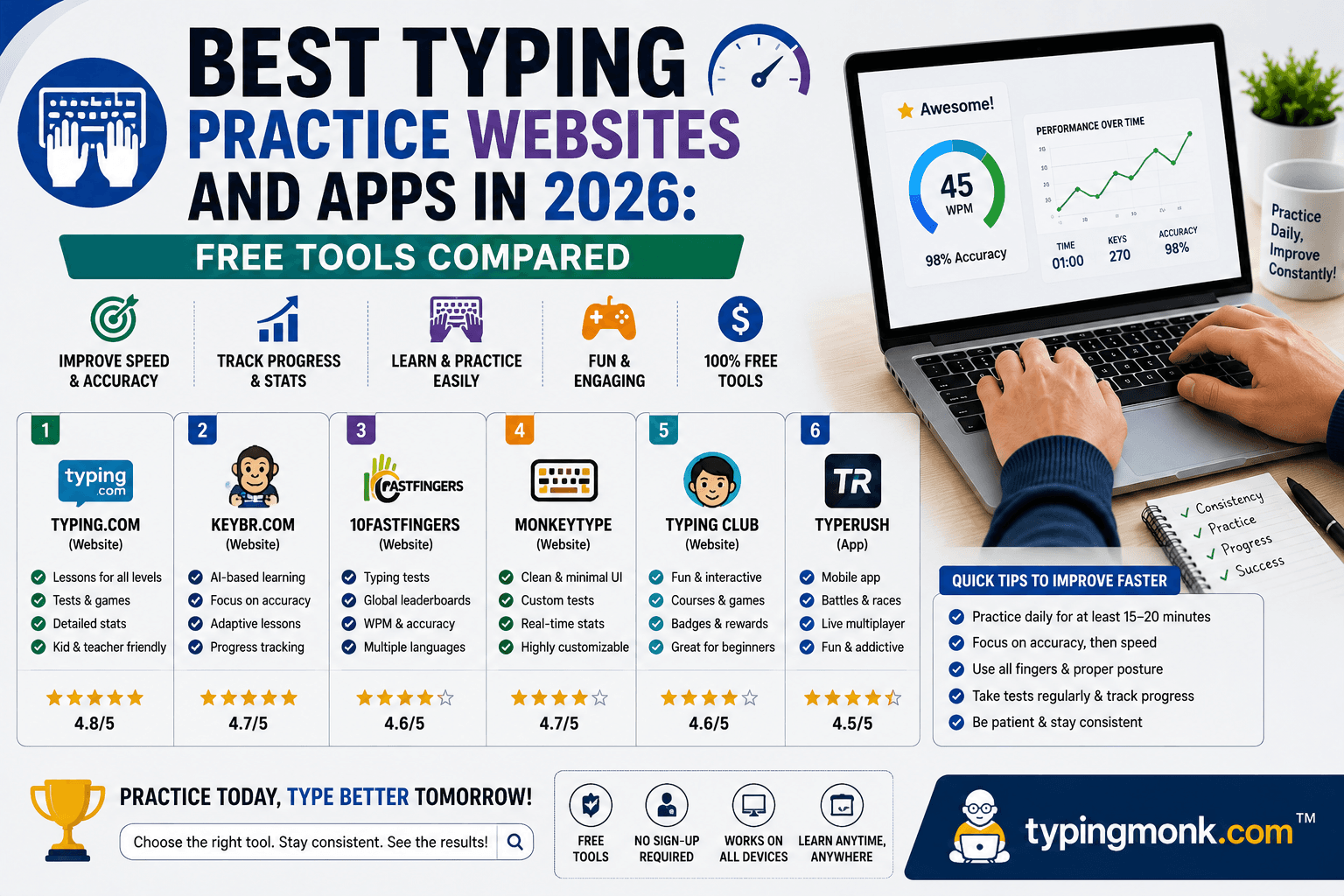
Monkeytype (monkeytype.com) is widely considered the most refined free typing practice platform available in 2026. It has a clean, minimalist interface with almost no visual clutter — just the test text and your input. This is not an accident: the design philosophy prioritizes the typing experience itself over gamification and visual rewards.
Monkeytype's customization depth is exceptional. You can configure test duration (from 15 seconds to custom lengths), word count, and content type. The platform offers multiple word lists — the top 200 most common English words, the top 1,000, or the top 10,000 — which is important because practicing with common words builds more transferable speed than practicing with rare vocabulary. It also supports custom word lists, quotes mode (typing real book passages), and code mode (typing programming syntax).
The statistics interface shows detailed performance metrics: WPM, accuracy, raw WPM (without error correction), consistency percentage (how even your speed was throughout the test), and a character-by-character error heatmap showing which specific keys you mistype most often. This level of detail is valuable for targeted improvement.
Monkeytype is free, requires no registration to use, and has no ads. An account allows you to track progress over time and access extended statistics.
Who Monkeytype is best for: typists who already have basic touch typing technique and want to improve speed and efficiency. The lack of structured lessons makes it less suitable for complete beginners.
Keybr: Best for Beginners Using Adaptive Learning
Keybr (keybr.com) uses an adaptive algorithm that is genuinely clever and highly effective for building speed from scratch. Rather than simply giving you random words or fixed lessons, Keybr tracks which letters you type most slowly or inaccurately and increases the frequency of those letters in the text it generates.
The algorithm works by starting with a small set of the most common English letters (E, T, A, O, I) and gradually introducing new letters as your speed and accuracy on existing letters improves. Words are generated from the unlocked letter set — they may not be real words, but they contain realistic letter patterns and bigrams (common two-letter combinations) that occur in actual English text.
This adaptive approach means every practice session is precisely calibrated to your current skill level. You are never practicing letters you already know at the expense of letters you struggle with, and you are never overwhelmed by a full keyboard when you are only ready for part of it.
Keybr provides clear visual feedback: bars showing your speed for each letter make it immediately obvious which letters are holding you back. The progress system is satisfying without being gamified to the point of distraction.
Who Keybr is best for: complete beginners learning touch typing for the first time, or typists who have uneven speed across different keys and want a systematic way to identify and fix weak spots.
TypingClub: Best Structured Curriculum for Beginners
TypingClub (typingclub.com) is one of the most widely used typing instruction platforms in the world, particularly in schools and organized learning environments. It offers a comprehensive, lesson-based curriculum that takes a student from finger placement on the home row through the full keyboard and beyond.
Each lesson introduces a small number of new keys and provides extensive practice before moving to the next lesson. The progressive structure ensures that each new key is added only after previous keys are solid. Animated hand diagrams show exactly which finger to use for each key, making it easy for beginners to learn correct form from the start.
TypingClub has classroom management features that allow teachers to assign lessons, monitor student progress, and set speed goals — making it the standard choice for schools and corporate training programs.
The platform introduces gamification elements (star ratings on lessons, achievements) that help motivate younger learners. The lesson quality is excellent, and the curriculum covers not just letter keys but numbers, symbols, and capitalization.
Who TypingClub is best for: complete beginners who benefit from structured instruction, students in formal learning environments, and organizations training employees in touch typing skills.
TypeRacer: Best for Competitive Motivation
TypeRacer (play.typeracer.com) is the original competitive multiplayer typing platform. You race against other users in real time, each typist represented by a car that moves faster as WPM increases. The races use passages from books, movies, songs, and speeches — text content that typists must type verbatim.
The competitive format is TypeRacer's primary strength. Many typists find that the presence of other racers increases their motivation and peak speed beyond what solo practice achieves. The race format also simulates pressure — similar to what you experience in actual typing tests — which helps build the mental composure to type accurately under stress.
TypeRacer's leaderboard tracks your all-time best and shows how you compare to other users globally. The top TypeRacer users regularly exceed 200 WPM, making the leaderboard an inspiring demonstration of what is possible.
The book and movie passages used in TypeRacer include common punctuation, proper nouns, and formatting that casual typing tests omit. This makes TypeRacer practice good preparation for any typing test that uses real-world text.
Who TypeRacer is best for: intermediate to advanced typists who benefit from competitive motivation, or any typist who wants to practice under pressure conditions that simulate real testing environments.
10FastFingers: Best Word-Frequency Practice
10FastFingers (10fastfingers.com) offers typing tests based on the most commonly used words in English. The top-200-words test is particularly valuable because it drills the vocabulary that appears in virtually everything you type — the words your fingers should know instinctively.
The platform also offers a multiplayer mode, custom typing tests, and a typing competition feature. The interface is simple and loads quickly, making it a good choice for quick practice sessions without setup or configuration.
The top-200-words approach has a specific benefit: because the same words appear repeatedly (the, a, is, to, in, you, it, of, and so on), your muscle memory for these ultra-common words becomes extremely strong. This can noticeably increase your overall WPM because you spend less cognitive effort on the words that make up the bulk of every typing test.
Who 10FastFingers is best for: intermediate typists who want fast, low-friction practice and specifically want to build speed on common words.
TypeForExam: Best for Indian Government Exam Preparation
TypeForExam (typeforexam.com) is specifically designed for Indian government exam aspirants. Unlike international platforms, TypeForExam simulates the exact conditions of SSC CHSL, SSC CGL, RRB NTPC, CPCT, and other major exams — including disabled backspace, exam-style passages, and the error calculation system used in each exam.
The platform provides separate practice modes for each exam with the correct duration and rules. Error reports show Full Mistakes and Half Mistakes as calculated under SSC or RRB rules, giving you accurate feedback on whether you would pass the actual exam.
Hindi typing practice with Krutidev 010 and Mangal Inscript fonts is supported. Government-style Hindi passages (administrative vocabulary, formal prose) are available for authentic exam preparation.
Who TypeForExam is best for: anyone preparing for SSC, RRB NTPC, or CPCT typing tests who needs to practice under actual exam conditions rather than general typing practice.
IndiaTyping: Best Bilingual Government Exam Practice
IndiaTyping (indiatyping.com) covers both English and Hindi typing with a focus on government exam preparation. It provides large passage banks organized by exam type and language, speed testing with results calculated according to Indian government exam standards, and font-specific Hindi practice.
The Hindi content on IndiaTyping covers all major layouts: Krutidev 010 Remington, Mangal Inscript, and Mangal Remington Gail. This comprehensive font coverage is harder to find on other platforms.
Who IndiaTyping is best for: Hindi typing practice and aspirants preparing for state and central government exams who need both English and Hindi practice content.
Ratatype: Best for Certificate Seekers and Learners
Ratatype (ratatype.com) offers structured typing courses and issues certificates upon completing typing speed assessments. The certificates are useful for job applications and resume additions in certain contexts.
The curriculum is progressive and well-organized, covering touch typing technique from scratch through full keyboard fluency. The platform tracks long-term progress through accounts and provides a clean interface without excessive advertising.
Who Ratatype is best for: learners who want a structured course experience and would value a typing speed certificate for professional purposes.
Building a Personal Practice Routine
The most effective approach in 2026 combines two or three platforms rather than relying on any single one.
A recommended combination for most typists: Use Keybr for the first 4 to 6 weeks to build accurate touch typing technique across all keys. Transition to Monkeytype for daily practice as you build speed — use it as your primary speed-building tool. Add TypeRacer for 2 to 3 sessions per week to practice under competitive pressure.
For government exam aspirants: Use IndiaTyping or TypeForExam for exam-specific practice. Add Keybr for weak-key identification if you have specific letters that consistently slow you down. Practice typing government-style passages (administrative, formal prose) rather than casual text.
For corporate or professional improvement: Use TypingClub for a structured course first if you do not yet touch type. Transition to 10FastFingers for high-frequency word practice and Monkeytype for sustained sessions. Add TypeRacer for competitive motivation.
The key to improvement on any platform is consistency. Fifteen to twenty minutes of daily focused practice beats two hours of practice twice a week. Progress in typing is built through repetition over time — there are no shortcuts to the motor memory development that underlies fast, accurate typing.
Tracking Progress Across Platforms
Most platforms offer free account registration with progress tracking. Setting up accounts on your two or three primary platforms lets you see WPM trends over weeks and months, identify plateaus (periods where WPM stops improving, signaling a need to change practice approach), and track accuracy improvements separately from speed improvements.
Take a baseline test on your first day of serious practice and record your results. Retest weekly on the same platform under the same conditions. The progress chart over a month of consistent practice is often the most motivating thing you can do for your continued commitment to improvement.
Put it into practice
Take a free typing test and see your WPM right now.
Comments
Sign in to leave a comment.