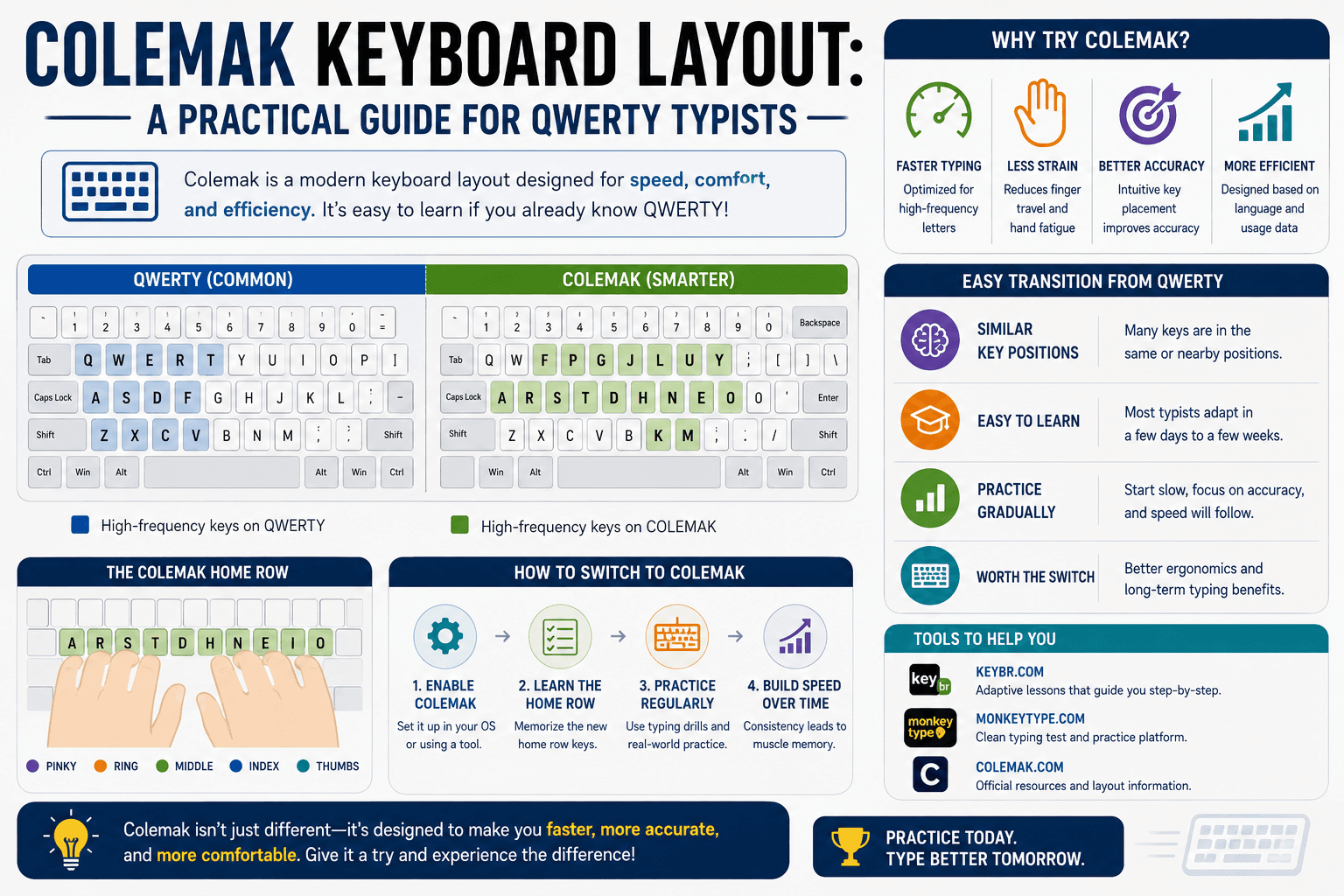
What Colemak is and why it was created
Colemak was designed in 2006 by Shai Coleman as a practical alternative to both QWERTY and Dvorak. Its design philosophy was to improve typing efficiency by relocating only the keys most likely to cause problems on QWERTY while keeping as many familiar QWERTY key positions as possible. The result changes 17 keys from QWERTY — compared to the near-total overhaul required by Dvorak — making it the most approachable layout switch for experienced QWERTY typists.
The guiding principle was placing the most frequent English letters on the home row and ensuring that common letter sequences alternate between hands. Colemak achieves approximately 74% home-row usage compared to QWERTY's 32% and Dvorak's 70%. The difference between Colemak and Dvorak in home-row utilisation is modest; the practical difference is primarily the shorter transition from QWERTY.
Key changes from QWERTY
The most significant Colemak changes are: E moves to the K position (home row); T moves to the G position; N moves to the J position; I moves to the L position; and the frequently-used keys R, S, T, and N are redistributed across the home row for better balance. Backspace moves to Caps Lock — a change beloved by Colemak users since Backspace is used constantly in typing and the Caps Lock key has a prime home-row-adjacent position but is rarely needed. ZXCV (undo, cut, copy, paste shortcuts) remain unchanged — a deliberate convenience for users who rely on keyboard shortcuts.
Letters that stay in QWERTY position include A, Z, X, C, V, B, M, and others. This means that roughly half of your QWERTY muscle memory is reusable in Colemak — a significant advantage over Dvorak where almost nothing transfers. The transition from QWERTY to Colemak is generally estimated to take two to four months to reach QWERTY-level speed, compared to four to twelve months for Dvorak.
Speed potential: what Colemak users report
Community surveys on dedicated Colemak forums (most notably colemak.academy and the r/Colemak subreddit) show that experienced Colemak users report speeds similar to or slightly higher than their peak QWERTY speed, typically after three to six months of practice. A minority report significant speed improvements — particularly users who switched at an early stage of QWERTY learning before QWERTY muscle memory was deeply encoded.
Objective comparative data between layout speeds is difficult to obtain because it would require the same typist to reach equal proficiency on both layouts — an experiment most typists do not undertake. The available evidence suggests that layout choice matters much less than practice volume and technique. A committed Colemak practitioner will reach similar speeds to a committed QWERTY practitioner with similar investment.
The Colemak-DH variant
Colemak-DH (also called Colemak Mod-DH) is a refinement of Colemak that moves D and H from positions that require lateral finger motion to positions on the bottom row that are reached by a more natural downward curl. Ergonomic research and typing community analysis identified that on standard staggered keyboards, the original Colemak positions for D and H required uncomfortable side-to-side movement. Colemak-DH addresses this while maintaining all other Colemak positions.
For matrix or ortholinear keyboards (where keys are arranged in a straight grid rather than a stagger), the original Colemak and Colemak-DH position differently: on ortholinear keyboards Colemak-DH is generally considered the better choice. For standard staggered keyboards, Colemak-DH is the variant recommended by the community, though the original Colemak remains perfectly usable.
Practical considerations before switching
The most important practical consideration is dual-layout requirement. If you regularly use computers at work, school, or public spaces that are configured for QWERTY and that you cannot remap, you will need to maintain functional QWERTY proficiency alongside your Colemak development. Most Colemak users report that QWERTY does not completely disappear — they can switch to a lower-speed QWERTY when necessary — but the additional cognitive overhead of maintaining two layouts is real.
Gaming is a specific consideration: many keyboard shortcuts in popular games are WASD-based. These can be remapped in most modern games, but they may not be remappable in all games, and some online competitive games may flag remapping software as third-party interference. Check your primary gaming titles before committing to a layout switch if gaming is a significant use case for your keyboard.
Is Colemak worth switching to in 2025?
For a typist who is early in their typing journey — under 40 WPM, not yet fluent in QWERTY touch typing — Colemak or Colemak-DH is a reasonable choice to consider as the primary layout to learn from the start. The long-term ergonomic profile is better than QWERTY, and learning Colemak first avoids the switching cost entirely.
For established QWERTY touch typists above 60 WPM who are comfortable and injury-free: the expected gain from a Colemak switch is unlikely to justify the transition cost. The ergonomic improvement is real but modest, and the speed gain at equilibrium is minimal. The strongest case for switching is discomfort or early RSI symptoms that suggest your current QWERTY usage pattern is causing physical problems — in that case, the layout change combined with improved posture and technique may provide genuine relief.
Put it into practice
Take a free typing test and see your WPM right now.
Comments
Sign in to leave a comment.