Why posture matters as much as speed
Many typing discussions focus exclusively on WPM and accuracy, but the physical experience of typing — posture, wrist position, and muscle use — determines whether you can sustain high-speed typing over a career without injury. Repetitive Strain Injury (RSI) is an umbrella term for conditions including carpal tunnel syndrome, tendinitis, and cubital tunnel syndrome that develop gradually from repeated awkward movements. In the UK and US, RSI accounts for millions of work days lost per year and is the leading cause of occupational injury in office environments.
The good news is that most typing-related RSI is preventable with relatively straightforward ergonomic adjustments that cost nothing in most cases. The key insight is that RSI does not develop from typing fast — it develops from sustained awkward posture during typing. A typist doing 80 WPM with correct posture is at lower risk than one doing 40 WPM with bent wrists.
The ideal typing workstation setup
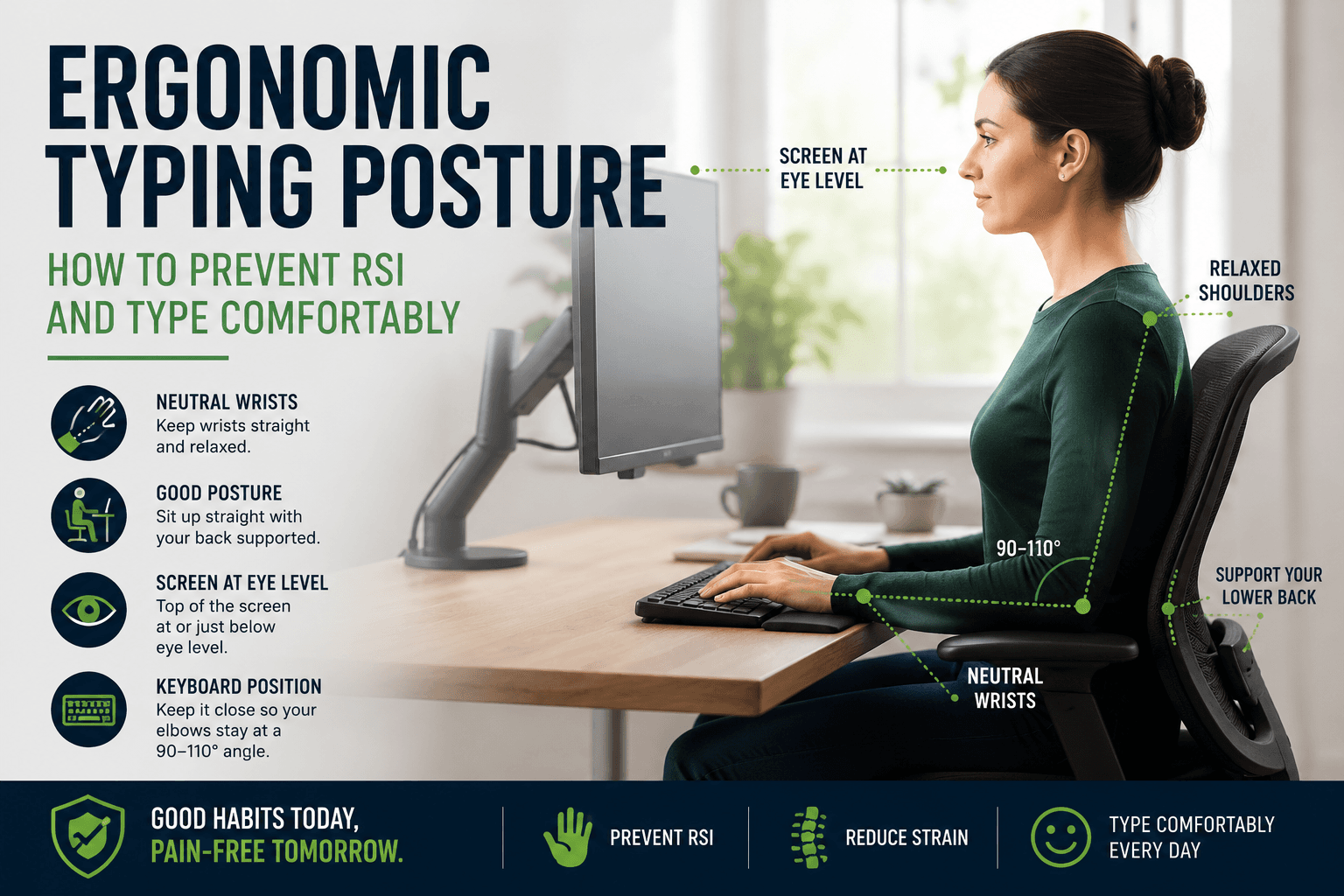
Chair height: your feet should rest flat on the floor (or a footrest) with your thighs roughly parallel to the floor. Your elbows should be at approximately 90 degrees when your hands are on the keyboard. Desk height: set so that your elbows are at 90 degrees with your forearms resting naturally. If the desk is too high, your shoulders hunch up; too low, and your forearms press down uncomfortably. Adjustable-height desks are the gold standard, but chair height adjustments can compensate for a fixed desk in many cases.
Monitor height and distance: the top of your screen should be at or slightly below eye level when you are sitting upright. Looking up at a screen strains the neck backward; looking down at a laptop creates sustained neck flexion. Monitor distance should be at arm's length — roughly 50–70 cm. At this distance your eyes accommodate comfortably and you receive enough peripheral vision to see the keyboard without consciously redirecting your gaze.
Wrist and hand position during typing
The single most important postural element for RSI prevention in typing is neutral wrist position. 'Neutral' means the wrist is straight — neither bent upward (extension) nor downward (flexion), and neither deviated toward the thumb (radial deviation) nor toward the pinky (ulnar deviation). Carpal tunnel syndrome is most associated with sustained wrist extension; cubital tunnel syndrome with sustained ulnar deviation. Both conditions compress nerves and restrict blood flow, initially causing tingling and eventually pain.
A common error is resting the wrists on the keyboard wrist rest while actively typing. Wrist rests are correctly used only during pauses — when your hands are off the keyboard between words or thoughts. During active typing, your wrists should float just above the keyboard surface, with the weight of your arms supported by your shoulder and forearm muscles. This feels effortful at first but becomes natural with practice and significantly reduces cumulative wrist stress.
Break schedules and micro-pauses
The 20-20-20 rule (every 20 minutes, look at something 20 feet away for 20 seconds) addresses eye fatigue but not typing fatigue. For hand and arm health, occupational health guidelines recommend a brief typing pause every 20–30 minutes and a longer break (standing, walking, stretching) every 60–90 minutes. These pauses need only be 30–60 seconds to meaningfully reduce cumulative strain — the critical factor is frequency, not duration.
Micro-pauses — the natural brief stops between phrases and sentences — also matter. Many fast typists develop a continuous high-speed typing rhythm that eliminates these natural rests. While this can be useful in short test bursts, sustained typing with no natural micro-pauses over hours increases the cumulative load. Allowing yourself natural pauses when reading the test text or thinking about the next phrase is physiologically healthy and rarely costs significant WPM.
Ergonomic keyboards and accessories
Split keyboards (such as the Kinesis Freestyle, ErgoDox, or Moonlander) physically separate the two halves to allow each hand to be positioned at a comfortable distance from the body with the keyboard angled outward. This eliminates the sustained inward rotation (pronation) of the forearms that flat keyboards require and is one of the most significant ergonomic improvements available. The learning curve for split keyboards typically takes two to four weeks.
Tented keyboards add a vertical angle that raises the thumb side of each hand higher than the pinky side — a more neutral forearm position than a flat keyboard. Negative-tilt keyboard slopes (keyboard angled away from the typist, front edge higher than back) are recommended by some ergonomists for reducing wrist extension. These interventions are worth exploring if you type more than four hours per day or already experience discomfort.
When to seek professional help
Tingling in the fingers, pain or numbness that persists after you stop typing, pain radiating up the forearm, or weakness in the grip are all symptoms that warrant professional evaluation — not continued typing practice. Early RSI is far easier to treat than established RSI. An occupational therapist can assess your workstation, technique, and symptom pattern, and a physiotherapist or hand specialist can advise on treatment. Do not ignore these symptoms in the hope they will resolve independently.
Preventively, an occupational health assessment is worth requesting if your job involves four or more hours of keyboard use per day. Most large employers have occupational health departments that provide these assessments. Small adjustments to chair height, monitor position, or keyboard placement identified by a professional assessment can prevent years of pain and lost productivity.
Put it into practice
Take a free typing test and see your WPM right now.
Comments
Sign in to leave a comment.