Why Switch Type Matters More Than You Think
When people buy a mechanical keyboard for typing, they often focus on the keyboard body, the keycaps, or the brand name. The switches — the mechanical components under each keycap that register a keystroke — are actually the most important variable in how a keyboard feels, sounds, and performs.
Every time you press a key, the switch determines how much force is required, whether you feel a physical bump as confirmation the key has registered, and whether the keypress produces a click sound. These properties directly influence typing comfort, error rate, fatigue levels, and speed over extended sessions.
This guide explains every switch category, compares the leading brands, and makes specific recommendations for typists in 2026 — whether you are preparing for a government exam, working a data-intensive job, or building a custom keyboard for everyday use.
The Three Switch Categories
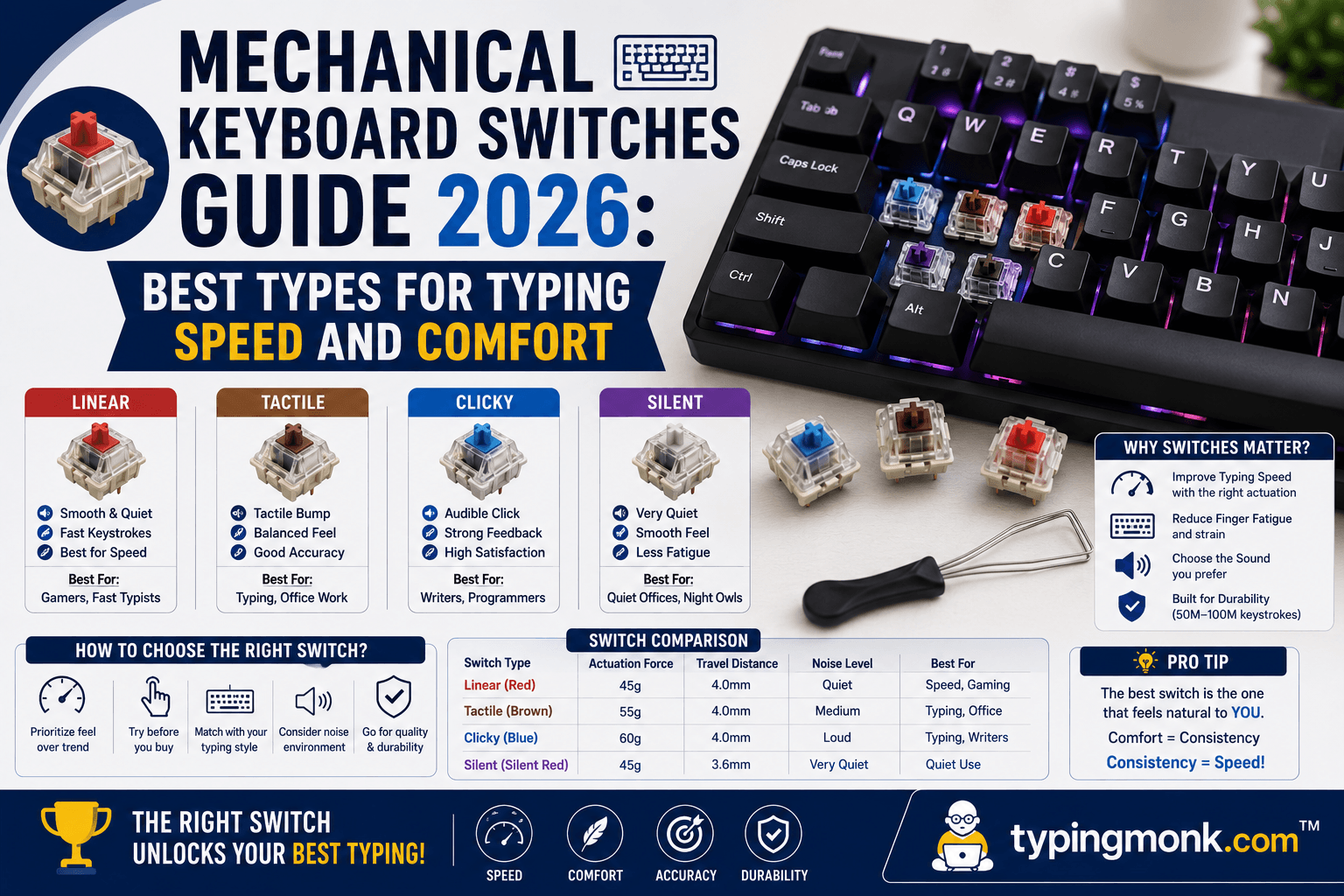
All mechanical switches fall into one of three categories based on their feel and sound profile.
### Linear Switches
Linear switches have a smooth, consistent keystroke from the moment your finger starts pressing to when the key bottoms out. There is no tactile bump and no audible click. The resistance builds smoothly and evenly throughout the key travel.
Linear switches are popular with gamers who need fast, consistent key presses. They are also preferred by typists who want quiet, smooth input without any interruption in the downward stroke. Writers who type long documents in flow states often prefer linears because there is no feedback interrupting the rhythm.
Common linear switches include: Cherry MX Red (actuation force 45g), Cherry MX Speed Silver (actuation force 45g, shorter 1.2mm actuation travel), Gateron Yellow (35g — very light, very popular for smooth feel), Gateron Red (45g), and Gateron Milky Yellow Pro V2 (35g with improved housing for quieter sound profile).
The primary criticism of linear switches from accuracy-focused typists is that without tactile confirmation, it is easier to mistype — your finger presses past the actuation point without any feedback that the key has registered. This leads some typists to bottom out keys more forcefully than necessary.
### Tactile Switches
Tactile switches have a noticeable bump approximately midway through the keystroke. This bump is a physical confirmation that the key has been actuated — the character has registered. After the bump, the key either bottoms out or you can choose not to fully depress it, potentially enabling faster repeat keystrokes.
Tactile switches are widely regarded as the best all-round choice for typing. The feedback reduces typing errors because your fingers feel when each character has registered. Office typists, writers, programmers, and administrative workers overwhelmingly prefer tactile switches.
Tactile switches come in light and heavy variants. Lighter tactile switches (like Cherry MX Brown at 45g) provide a gentle bump that is easy to overlook. Heavier tactile switches (like the Holy Panda or Boba U4T at 60 to 67g) provide a pronounced, satisfying bump that is unmistakable.
Common tactile switches include: Cherry MX Brown (45g, mild bump — the world's most widely used keyboard switch), Gateron Brown (45g, slightly smoother housing than Cherry), Cherry MX Clear (65g, heavier tactile for typists who want more feedback), Boba U4T (65g, excellent tactile bump with relatively quiet sound), and the legendary Holy Panda (67g, produced by Drop — highly regarded in the custom keyboard community).
### Clicky Switches
Clicky switches have both a tactile bump and an audible click. The click is produced by a click jacket mechanism inside the switch stem. The sound is distinctive and satisfying for many typists — the auditory confirmation reinforces the tactile confirmation.
The significant drawback of clicky switches is noise. In a shared office environment, the continuous clicking of a clicky mechanical keyboard is genuinely disruptive to nearby colleagues. Clicky switches are appropriate for home use, private offices, or environments where typing sound is not a concern.
Common clicky switches include: Cherry MX Blue (50g actuation, the most recognizable clicky switch sound), Gateron Blue (50g, slightly crisper click than Cherry), Kailh Box Jade (50g, heavier actuation click, louder and more solid sound), Kailh Box White (45g, lighter click variant), and the Razer Green switch (Cherry Blue clone with brand-specific tuning).
Cherry MX vs. Gateron: An Honest Comparison
Cherry MX and Gateron are the two dominant switch manufacturers, and the comparison between them comes up in virtually every mechanical keyboard discussion.
Cherry MX is a German company founded in 1953. Their switches have been the industry standard for decades. Cherry MX switches are known for precise quality control, long-documented durability (rated to 100 million keystrokes), and wide compatibility with third-party keycap manufacturers. The MX mount is the industry standard stem design that virtually all aftermarket keycaps are built to fit.
Cherry MX's main criticism in 2026 is that their linear switches are noticeably scratchier than competitors' linears — a tactile roughness that many enthusiasts find less satisfying compared to Gateron's smoother alternatives. Cherry tactile switches (Brown, Clear) remain well-regarded.
Gateron is a Chinese company that has grown from producing budget Cherry MX clones to manufacturing premium, highly regarded switches in their own right. Gateron linear switches — particularly the Milky Yellow Pro V2 and the Gateron G Pro series — are widely considered smoother out of the box than Cherry MX Red or Black switches. Gateron's quality control has improved significantly in recent years.
Gateron switches are approximately 40 to 60 percent less expensive than Cherry MX switches per unit, making them the dominant choice in mid-range mechanical keyboards.
The practical conclusion: for tactile switches, Cherry MX Brown and Clear remain excellent choices. For linear switches in 2026, Gateron Yellow or Milky Yellow Pro V2 offer better smoothness per dollar than Cherry MX Red. For clicky switches, both Cherry MX Blue and Gateron Blue are reliable, with the Gateron producing a crisper sound profile.
2026 Trends: What Is New in Switch Technology
The mechanical switch market in 2026 shows several notable developments.
Hall Effect magnetic switches are the most technically significant trend. Keyboards like the Keychron Lemokey P1 HE use magnets rather than physical contact points to register keystrokes. Magnets do not wear down, giving Hall Effect switches essentially unlimited lifespan. More importantly, they allow adjustable actuation points — you can set the switch to register at 0.5mm travel or at 4mm travel, depending on your preference. For competitive gaming this is revolutionary, but for typists, Hall Effect keyboards offer customizable feel without needing to swap physical switches.
Factory lubing has improved dramatically. Three years ago, enthusiasts routinely disassembled every switch and hand-lubed each one to achieve smooth performance. Modern premium linears from Gateron, Akko, and WS arrive factory-lubed with quality lubricant, delivering smooth feel out of the box that previously required an afternoon of manual work.
Low-profile switches are gaining market share for laptop-replacement keyboards. Gateron Low Profile, Kailh Choc, and Cherry MX LP switches provide a more compact key travel (2.5 to 3mm versus 4mm for standard switches) suited to people who want the benefits of mechanical switches in a thinner keyboard form factor.
Sound engineering has become as important as actuation feel. Buyers care about whether a switch sounds "thocky" (deep, low-frequency sound), "clacky" (sharp, higher-frequency), or "clicky" (mechanical click). This has driven the development of sound-dampened linears and housing materials specifically designed to reduce reverb.
Best Switches for Specific Typing Use Cases
For general office typing (long documents, email, reports): Cherry MX Brown or Gateron Brown. The mild tactile bump reduces errors without producing significant noise. This is the recommendation for most people in most shared work environments.
For heavy daily typing (writers, journalists, programmers who type 8+ hours daily): Boba U4T or Holy Panda. The more pronounced tactile bump reduces unconscious bottoming-out, which is the primary cause of finger fatigue over long sessions. The heavier actuation (60 to 67g) also builds better typing posture over time.
For quiet office use: Cherry MX Silent Red, Gateron Silent Brown. These switches have dampeners built into the stem that absorb the sound of bottoming out and returning, making them noticeably quieter than standard switches. Suitable for open-plan offices where mechanical keyboard noise would be disruptive.
For exam preparation (government typing tests): Tactile switches (Brown variants) are often recommended because the bump feedback helps maintain accuracy under pressure. The bump confirms each keystroke has registered, which is valuable when typing at speed in high-stakes conditions.
For gaming primarily, typing secondarily: Gateron Yellow or Cherry MX Speed Silver. Fast actuation and smooth feel optimize for rapid key presses.
For first mechanical keyboard purchase: Gateron G Pro Brown (budget) or Cherry MX Brown (mainstream). Both provide the tactile experience that best represents what mechanical keyboards offer compared to membrane alternatives.
Ergonomic Keyboard Considerations
Beyond switches, the keyboard layout itself affects long-term typing comfort. The standard ANSI/ISO layout with all keys in straight rows does not match the natural arc of finger movement. Modern ergonomic keyboard designs address this.
Split keyboards (such as the ZSA Moonlander or Kinesis Advantage360) divide the keyboard into two halves positioned at shoulder width, eliminating the inward rotation of the wrists that standard keyboards require. Studies show split keyboards reduce shoulder and wrist strain significantly for heavy daily users.
Alice-layout keyboards use a mild angular split without fully separating the halves. They fit on a standard desk footprint and provide a moderate ergonomic improvement over straight layouts. The Keychron Q8 and various KBDfans boards use this layout.
Columnar-stagger layouts place keys in straight vertical columns matching how fingers naturally extend, rather than the diagonal stagger inherited from typewriter mechanics. These are less common but are considered the most ergonomically optimal by serious keyboard enthusiasts.
For casual to moderate typists, the ergonomic benefit of a premium split or columnar keyboard is real but not urgent. For people who type 6 to 8 hours daily and are experiencing early wrist or shoulder discomfort, a split keyboard combined with good tactile switches can meaningfully reduce strain.
Making Your Choice
The mechanical keyboard market can feel overwhelming with hundreds of switch options, dozens of keyboard designs, and strong opinions throughout the enthusiast community. For most people, the decision simplifies to: quiet or slightly louder, light or medium actuation force, and budget.
If you are new to mechanical keyboards, start with a mid-range keyboard featuring Gateron Brown or Cherry MX Brown switches. These switches are genuinely good — used by millions of professionals — and will give you a clear sense of what tactile mechanical typing feels like before you invest in premium options.
The global mechanical keyboard market reached $2.05 billion in 2026 and is projected to nearly double by 2030, driven by growing awareness of ergonomic benefits and typing experience. This growth means the quality and variety available at every price point continues to improve. There has never been a better time to find a mechanical keyboard that fits your exact typing preferences.
Put it into practice
Take a free typing test and see your WPM right now.
Comments
Sign in to leave a comment.