Know your target before you start practicing
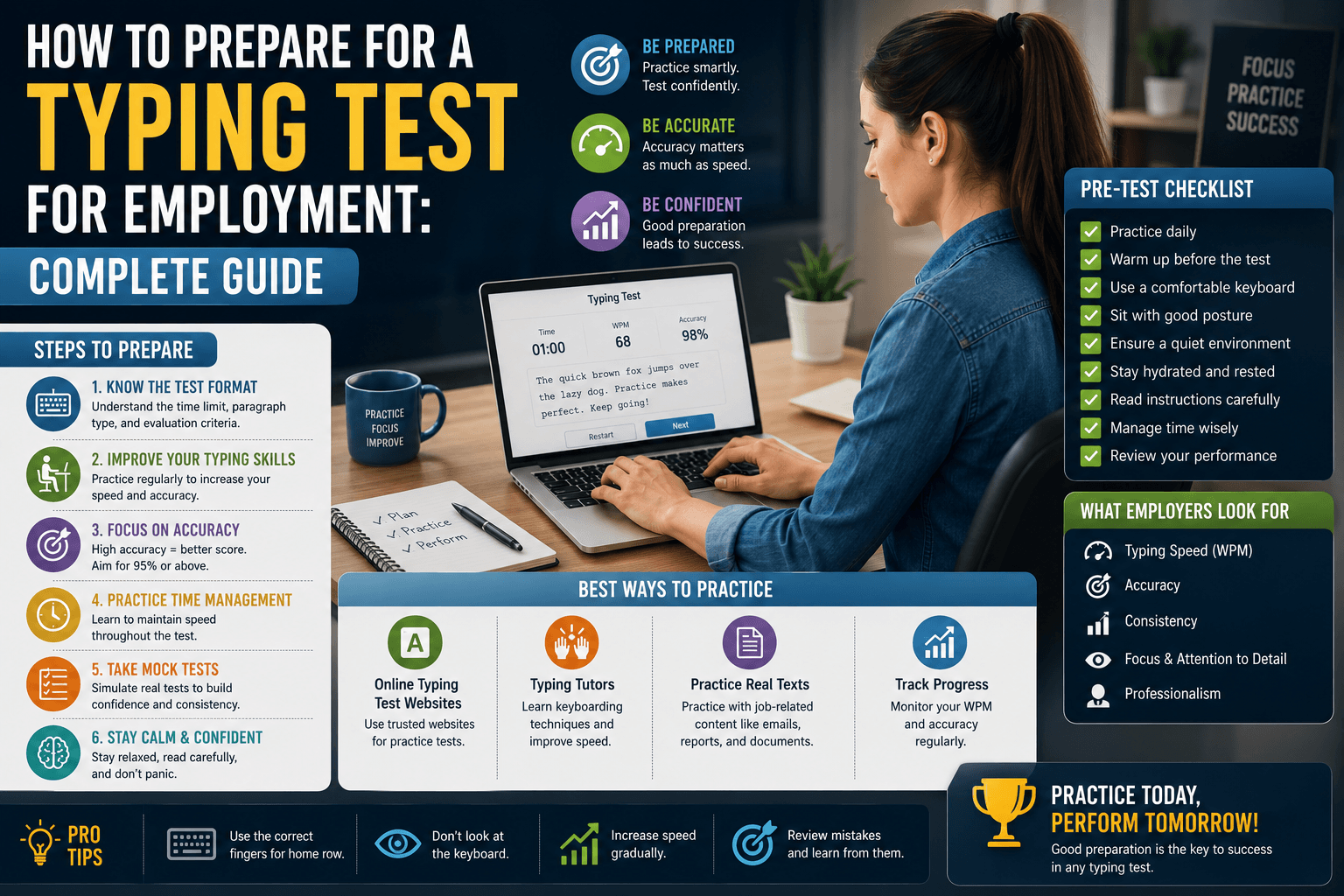
The single biggest mistake candidates make in typing test preparation is practicing without knowing the specific requirements. 'Prepare for a typing test' is not a specific goal — '55 WPM with 95% accuracy on a 5-minute test, scored by net WPM' is. Before beginning any practice, find out: What is the required WPM? Is the measurement gross WPM, net WPM, or both? What is the minimum accuracy? What is the test duration? What vocabulary type is used — standard prose, medical, legal, or alphanumeric data?
If the job posting does not specify, contact the HR department or recruiter and ask directly. Most employers are willing to provide these details and appreciate that a candidate is taking preparation seriously. If the test is administered through a specific platform, see if there is a free practice mode on that platform — the exact software and text style can affect your score independently of your underlying speed.
Understanding how employment tests score errors
Error scoring methodology varies significantly across employers and platforms. Type 1: Errors not allowed — some platforms require you to correct each error before moving to the next word; there is no option to skip forward. This penalizes you in time (you must backspace and retype) but allows you to produce a clean score if you are fast enough. Type 2: Net WPM deduction — each uncorrected error at the end reduces your WPM by a fixed amount (typically 1 WPM per error). This rewards leaving minor errors and continuing forward rather than stopping to correct.
Type 3: Separate accuracy score — the test reports gross WPM and accuracy as separate numbers, with both needing to meet thresholds. In this format, one or two errors in a five-minute test barely affects your accuracy percentage, so prioritize raw speed. Understanding which format you will face determines your practice strategy. If you do not know, practice for both — with a focus on sustaining speed while keeping accuracy above 95%.
Four-week preparation plan
Week 1 — Baseline and form check: Take one 5-minute test per day on Medium difficulty. Record every result. At the end of the week, calculate your average WPM and accuracy. If accuracy is below 93%, your primary focus for weeks 2–3 is accuracy, not speed. Check your finger placement — are you using the correct finger for every key? Identify your most frequent error characters.
Week 2 — Accuracy consolidation: Slow your typing to 85% of your week-1 WPM and hold 97%+ accuracy. This is a deliberate step back to reinforce clean pathways. Add one 1-minute test as a warm-up each session. If your week-1 accuracy was already above 95%, skip this phase and focus on incremental speed increases of 3–5 WPM. Week 3 — Build to target speed: Gradually increase your pace back to week-1 speed and then beyond. Set a target 5–10 WPM above the employer's required minimum. Practice under simulated test conditions — no warm-up, the same keyboard you will use, no background distractions.
Simulating the actual test environment
Professional sports preparation includes environmental simulation — athletes practice in conditions that mirror competition to reduce novelty stress on the day. The same principle applies to typing tests. In week 4, take your practice sessions under conditions that match the actual test as closely as possible: same time of day, same device, no warm-up before the timed test begins, similar background noise level.
If you know the platform (for example, TypingMonk, Kenexa, Retype), practice on that specific platform in the week before the test. Interface familiarity — knowing where to look, how the timer is displayed, how errors are highlighted — reduces cognitive load on the day. Even small elements like the font used for the test text can affect performance if completely unfamiliar.
The day before and day of the test
The day before: do a single 5-minute practice test, nothing more. Over-practicing the day before a skill assessment introduces fatigue and anxiety without improving your underlying speed. Review any test-format specifics you have gathered (scoring method, duration, vocabulary type). Prepare your physical setup: test the keyboard, ensure your internet connection is stable if the test is online, and confirm the login details for any proctored platform.
On the day: eat something light beforehand, stay hydrated, and do a single 2-minute warm-up test fifteen to twenty minutes before the real test — not immediately before, to give your hands a short rest. In the test itself: start steadily rather than in a burst, maintain your practice accuracy threshold, and do not panic if the first few lines feel unfamiliar. The first thirty seconds of a test are the highest-variance period; once you settle into the rhythm, your trained speed will emerge naturally.
After the test: interpreting your result
If you met the required threshold: well done — but use the result as a data point, not a ceiling. The skills you built preparing for the test will continue developing with use in the role. If you narrowly met the threshold: consider whether the role will require sustained high-speed typing; if so, continue deliberate practice after starting the job to build the buffer that sustained performance demands.
If you did not meet the threshold: do not treat it as a reflection of your fundamental ability. Most typing speed improvements are relatively rapid for motivated learners — 10–15 WPM gains in four to six weeks of structured practice is achievable for most adults. Ask whether the employer offers a retest opportunity. Resume your practice plan with the specific gap between your result and the required WPM as your clearly-defined target.
Put it into practice
Take a free typing test and see your WPM right now.
Comments
Sign in to leave a comment.